
Table of Contents
ToggleIT Infrastructure Setup for New Offices in Qatar: What You Need from Day One
Opening a new office in Qatar is an exciting milestone but the technology decisions you make at the start will affect how smoothly your business runs for years to come. Getting the IT infrastructure right from day one prevents the costly rework, downtime, and frustration that comes from building on a weak foundation.
Austin Technology has helped businesses across Qatar set up complete IT environments from a single room to multi-floor offices. This guide covers what you need to plan, and in what order.

1. Start with a Structured Cabling Plan
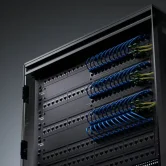
Before a single device is installed, your office needs a proper structured cabling system. This means planning and installing the physical network ethernet cabling, patch panels, server rack positioning, and cable routes before furniture goes in and walls are finished.
Trying to retrofit cabling into a finished office is expensive, disruptive, and results in a messy, unreliable network. Doing it at the fitout stage costs a fraction of the price and gives you a clean, professional installation that is easy to expand later.
What a structured cabling plan includes:
- Cat6 or Cat6A ethernet cabling to all workstations, meeting rooms, and common areas
- Data cabinet or server rack positioned in a ventilated, secure location
- Patch panels and cable management within the rack
- Cable labelling throughout for easy fault finding and future changes
- Conduits and trunking for a clean finish
2. Choose the Right Internet Connection
Qatar has two main internet service providers Ooredoo and Vodafone Qatar. For a business office, a dedicated business fibre connection is the minimum requirement. The connection speed you need depends on your team size and how heavily your business relies on cloud services.
| Team Size | Recommended Connection |
|---|---|
| 1–10 users | 100 Mbps fibre |
| 10–30 users | 200–500 Mbps fibre |
| 30+ users | 1 Gbps fibre or dedicated leased line |
For offices where uptime is critical, we recommend a backup 4G connection using a Teltonika router with dual SIM failover if your primary fibre line goes down, the office automatically switches to 4G with no interruption.
For offices where uptime is critical, we recommend a backup 4G connection using a Teltonika router with dual SIM failover if your primary fibre line goes down, the office automatically switches to 4G with no interruption.
3. Set Up Your Core Network Firewall, Switch, and WiFi
Firewall
A business-grade firewall is non-negotiable. It controls what traffic enters and leaves your network, blocks threats, and enforces security policies. Consumer routers provided by ISPs are not adequate for business use. Austin Technology installs and configures firewalls from leading brands including Cisco and Fortinet.
Managed Switch
A managed switch connects all your wired devices — workstations, printers, IP phones, servers — and gives your IT team control over network traffic, VLANs, and access policies.
Wireless Access Points
4. Servers and Storage
On-Premise Servers
If your business runs applications locally accounting software, ERP systems, file servers you will need a server in your office rack. Austin Technology supplies and configures Dell and HP servers sized for your workload.
Cloud Storage and Microsoft 365
Most new offices in Qatar are moving to Microsoft 365 for email, file storage, and collaboration tools. This reduces the need for on-premise servers and gives your team access to files from anywhere. Austin Technology handles Microsoft 365 licensing and migration.
Backup
Regardless of whether you use on-premise or cloud, you need a backup system. We implement the 3-2-1 rule: three copies of data, on two different media types, with one copy offsite or in the cloud.
5. Workstations, Laptops, and Peripherals
Once the network is ready, it is time to provision the devices your team will use. Austin Technology supplies business-grade laptops, desktops, and monitors from Dell, HP, and Lenovo all configured and ready to use from day one. For offices issuing devices to multiple employees, Formcase charging cabinets provide secure, organised storage and overnight charging.
6. Software and Licensing
Getting licensed software in place from the start prevents compliance issues later. Common requirements for new offices in Qatar include:
- Microsoft 365 for email and productivity (Word, Excel, Teams)
- Antivirus and endpoint protection for all devices
- Any industry-specific software your business requires
- VPN software if staff will work remotely
7. IT Support and Maintenance
Once your office is set up, you need a plan to keep it running. An Annual Maintenance Contract (AMC) with Austin Technology gives you scheduled preventive maintenance, remote monitoring, and priority on-site support throughout the year all for a fixed annual fee.
Your Complete New Office IT Checklist
- Structured cabling plan completed before fitout
- Business fibre internet connection ordered
- Backup 4G router (Teltonika) installed and configured
- Firewall, managed switch, and wireless access points installed
- Server or cloud storage configured
- Backup system set up and tested
- Workstations and laptops provisioned and configured
- Microsoft 365 licensed and set up
- Antivirus and security software deployed
- AMC agreement in place for ongoing support
Let Austin Technology Set Up Your New Office in Qatar
We handle the full project from cabling to configuration so you can focus on your business. Our team in Doha has experience with offices of all sizes across Qatar’s corporate, government, and education sectors.
Contact us today for a free consultation and quote.
📍 First Floor, Arkan 12, Barwa Commercial Avenue, Doha
📞 +974 4411 7985
✉ sales@austintech.qa